Independently
All approvers are notified at the same time and respond independently.
Controlled document management
Ulysses helps quality and operations teams find the current policy or procedure, move reviews and approvals forward, and manage every document from first draft to archive, in one connected workspace.

Organisations across Western Australia work with Monarch360, the team behind Ulysses.







The challenge
Policies are revised. Procedures are copied, emailed and saved locally. Before long, people are working from documents nobody meant them to use.
Ulysses connects search, review, approval, improvement tasks and lifecycle actions, so document owners can see what needs attention and everyone else can find what is current.
Find
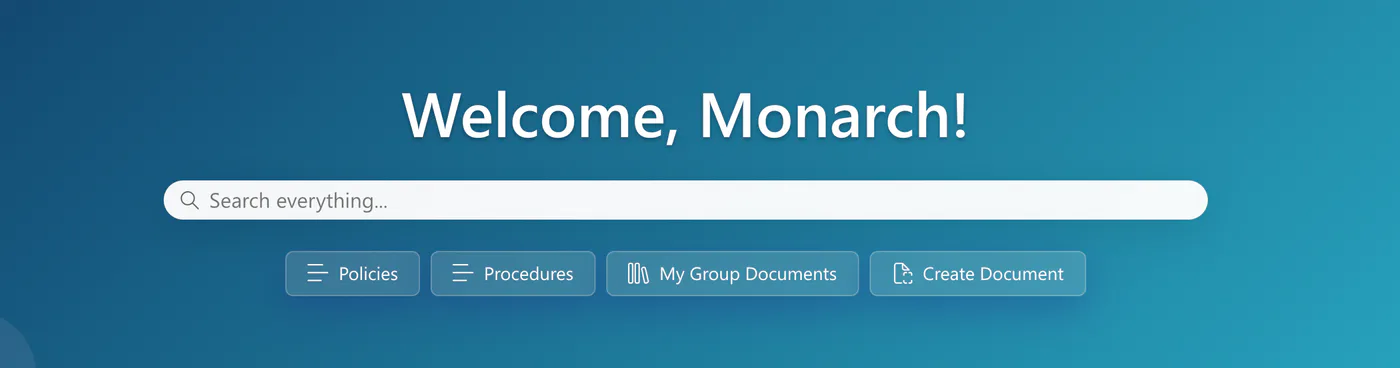
Search across Publish, Native and Archive from the Ulysses home page. Quick links take people straight to Policies, Procedures and their own group's documents, and new work starts from the same place.
Orientation
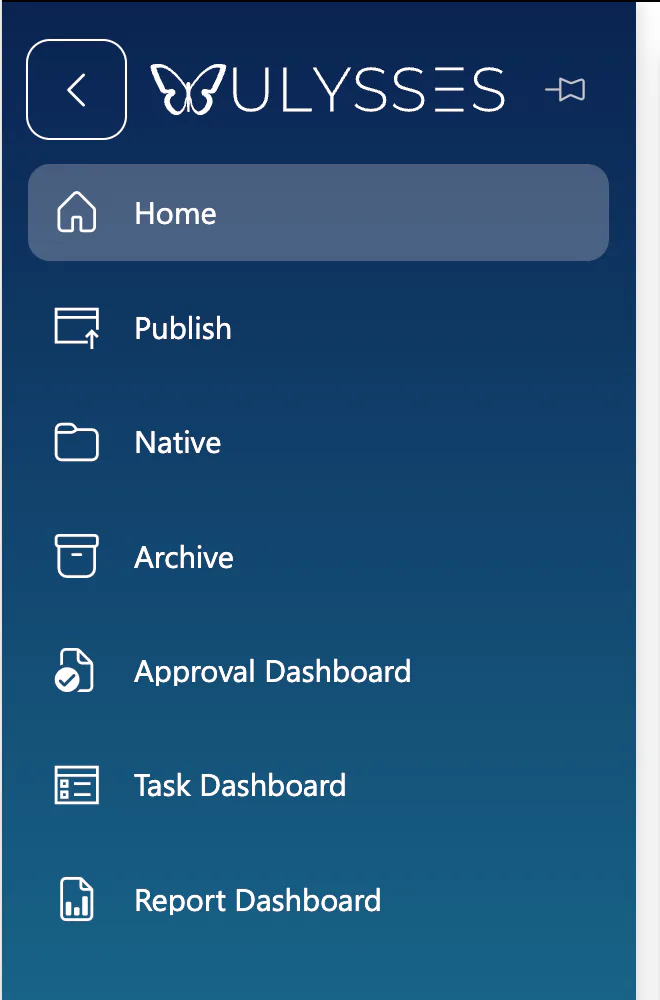
Publish, Native and Archive each have their own area in the navigation, alongside dedicated dashboards for approvals, tasks and reporting. People always know where they are and where to go next.
Improve
Assign tasks to improve a document and give each one a clear owner. Every task shows the linked document, who it is assigned to, who assigned it, its status and its due date.
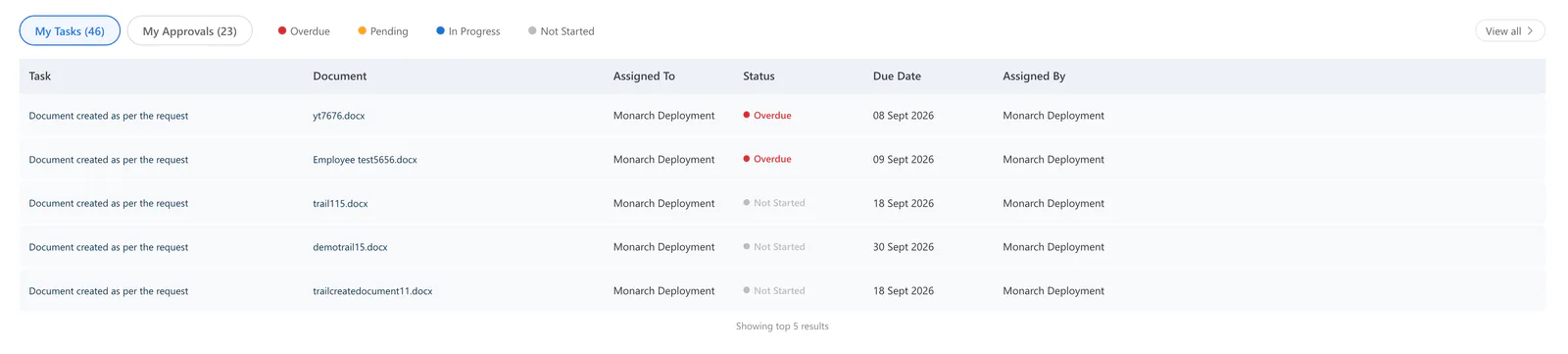
My Tasks and My Approvals sit on the home page. The Task Dashboard gives the complete view.
Review and approval
Request a review or an approval from the document actions menu. Choose the approvers, add comments, then pick the route that suits the document.
All approvers are notified at the same time and respond independently.
Approvers respond along a set route, one after another.
The Approval Dashboard and My Approvals give every approver a clear queue.
Lifecycle
Create or update a document, request review, obtain approval and publish. When content changes or is withdrawn, use supersede or obsolete actions as part of your document-control process.
Browse and search a template library by category, including HR, Finance and Technical, so policies, procedures and forms begin the same way.
See document type, document number, risk rating, requestor, reviewers and approvers alongside the document itself.
Obsolete means withdrawn from use. Superseded means replaced by another approved document or revision. Archive is where historical content is kept.
Reporting
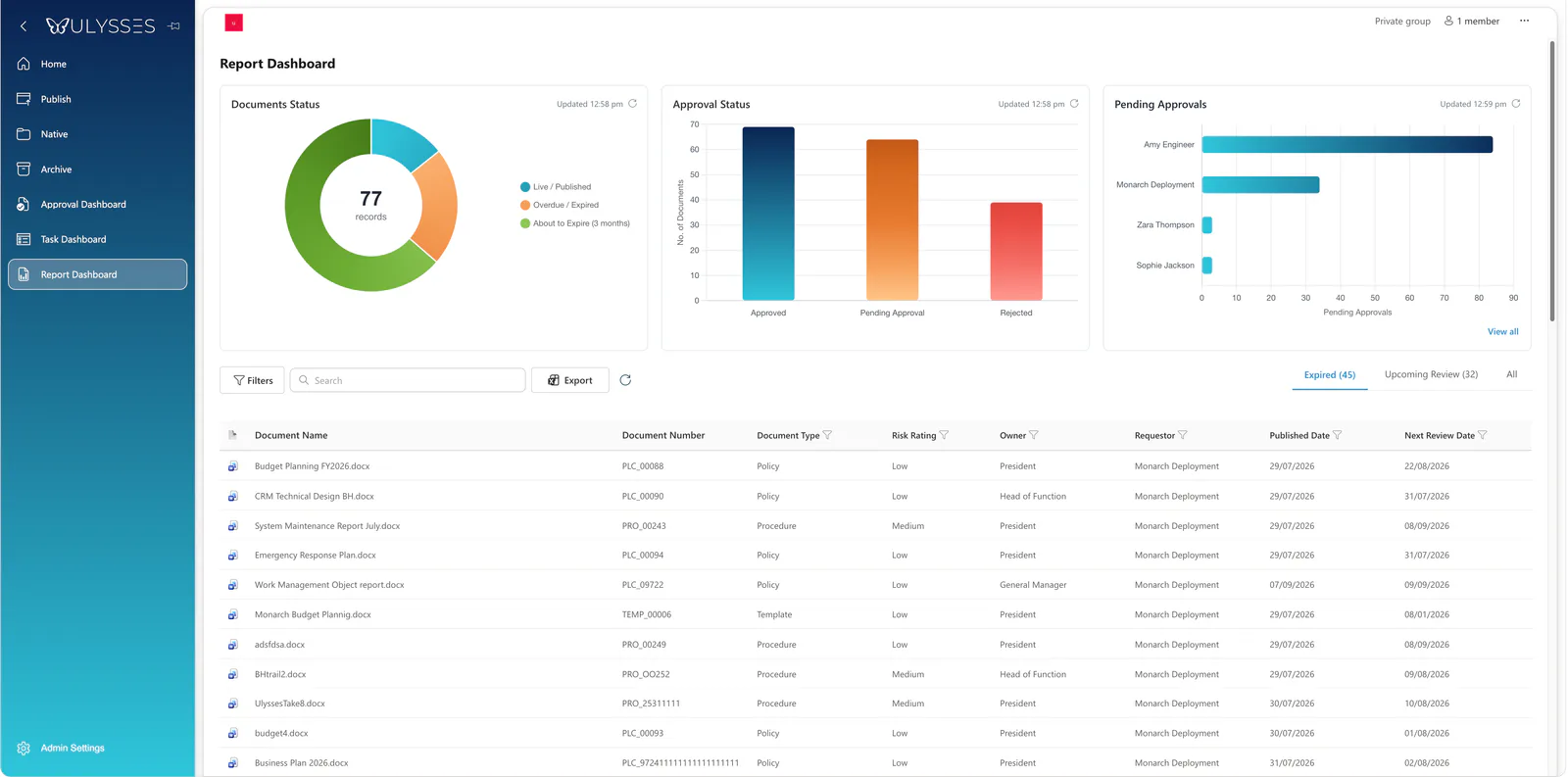
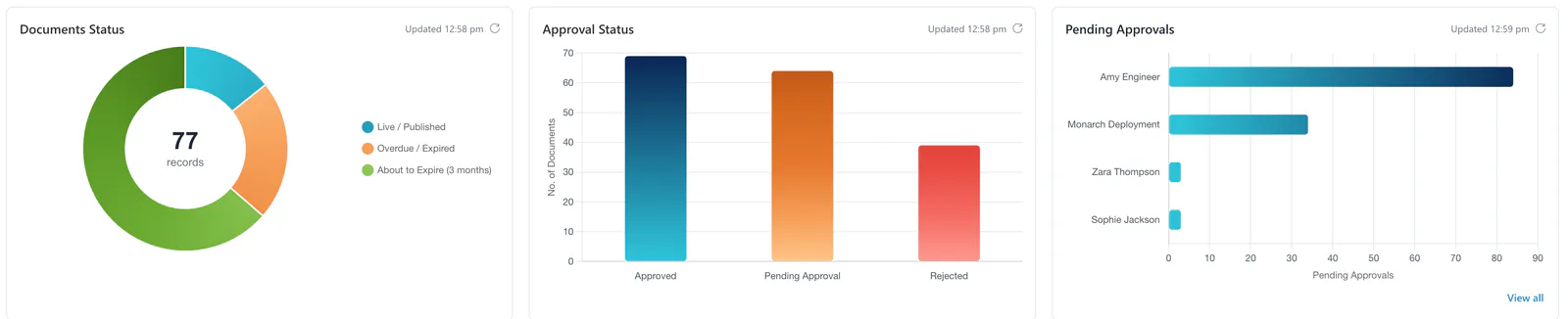
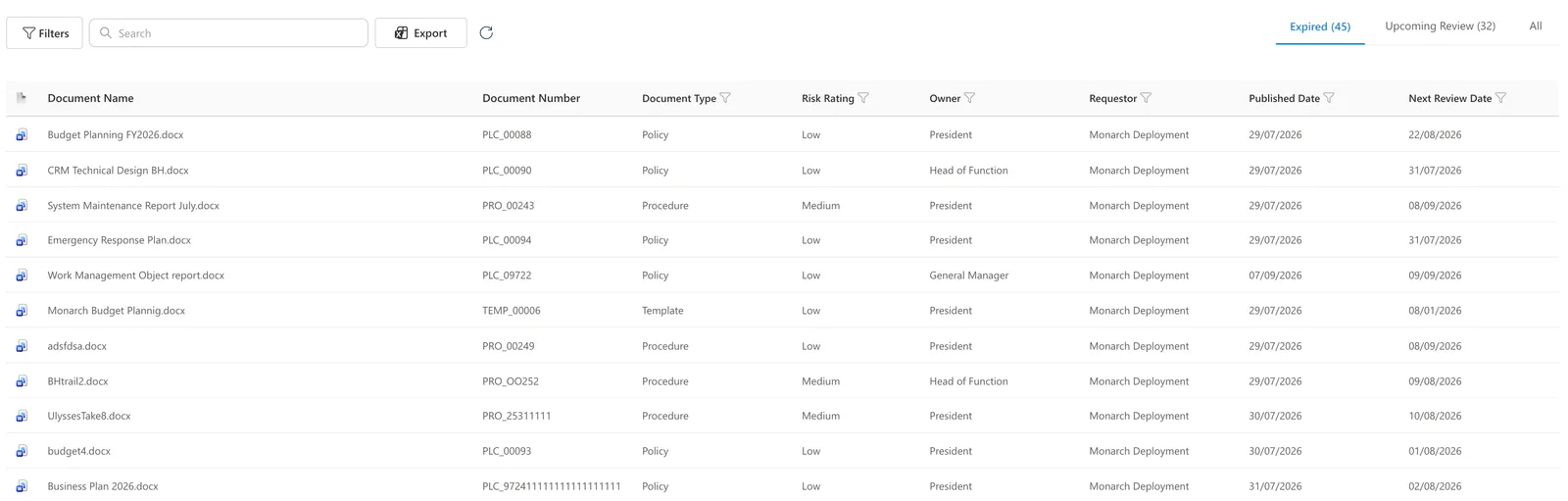
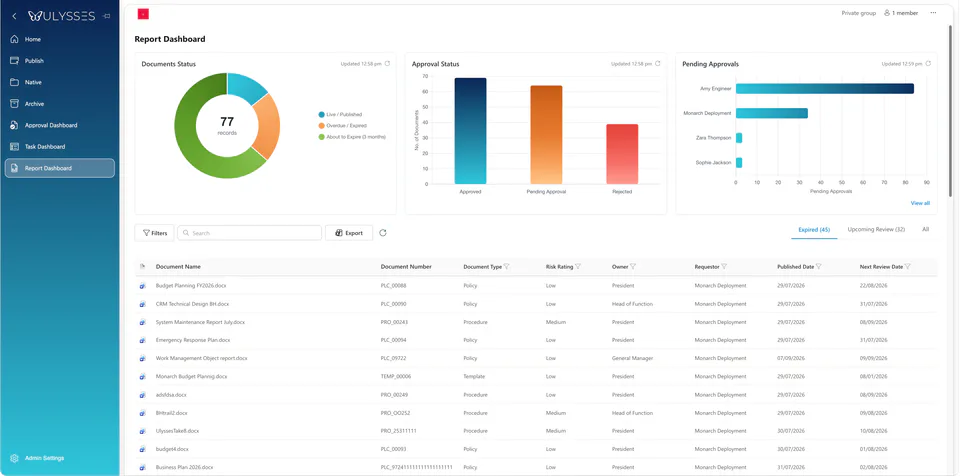
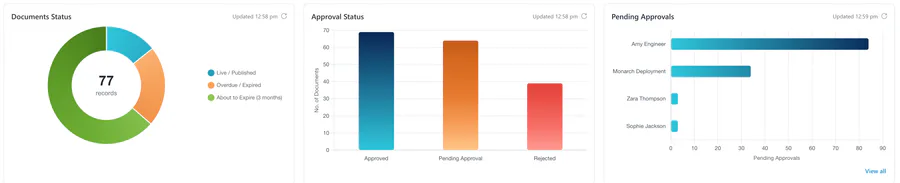
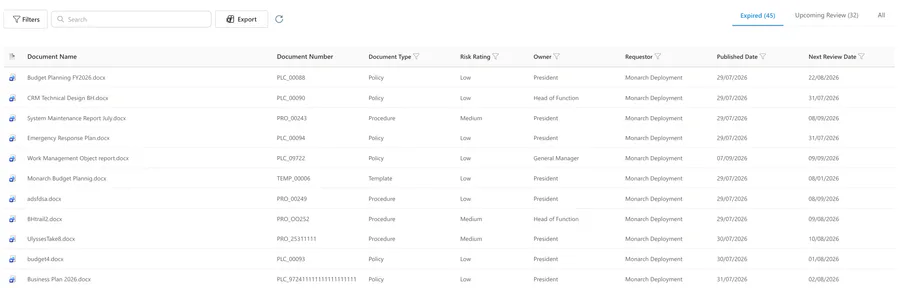
The Report Dashboard brings document status, approval status and pending approvals together with a register that document owners and quality teams can filter, search and export.
01
Three charts across the top, the document register below. Everything a document owner needs to plan the week.
02
Documents Status separates live and published, overdue or expired, and about to expire within three months. Approval Status shows approved, pending and rejected. Pending Approvals shows who is holding what.
03
See each document's number, type, risk rating, owner, published date and next review date. Switch between Expired and Upcoming Review, then filter, search and export the register.
Quality management
Ulysses supports ISO 9001 document-control practices through review and approval workflows, document identification, ownership, review-date visibility and lifecycle actions.
Effective compliance depends on your procedures, configuration and evidence. Software alone does not establish certification.
From Monarch360
Ulysses is a Monarch360 product, made in Perth, Western Australia. It sits alongside Monarch EDRMS for records management and Apollo for meeting management, with its own focus on controlled documents.
Book a demo
Bring a procedure your team revises often. We will walk through finding it, assigning an improvement, requesting review and approval, publishing the update and managing the outgoing version.
Ulysses is controlled document management software. It brings document search, review and approval requests, improvement tasks, lifecycle actions and reporting into one connected workspace.
Quality and operations teams, document owners, authors, approvers and everyday readers who need to find the current version of a policy, procedure or form.
From the Ulysses home page, people can search across the Publish, Native and Archive areas, or use quick links to Policies, Procedures and My Group Documents.
Approval requests are started from the document actions menu. The requester chooses approvers, adds comments and selects either independent approval, where all approvers are notified at the same time, or in-order approval.
In document control, an obsolete document has been withdrawn from use, a superseded document has been replaced by another approved document or revision, and archived describes where historical content is kept. Ulysses provides obsolete and supersede actions and a dedicated Archive area.
No software establishes certification on its own. Ulysses supports ISO 9001 document-control practices through review and approval workflows, document identification, ownership, review-date visibility and lifecycle actions. Effective compliance depends on your procedures, configuration and evidence.
Ulysses is a product of Monarch360 Pty Ltd in Perth, Western Australia, the company behind Monarch EDRMS and Apollo. Ulysses is a separate product with its own capabilities, which we will confirm with you during solution scoping.